STATBUS
A Generic SBR
Web Application
Recent & Upcoming
Statbus has during 2024-2026 been improved to be a more user-friendly and robust system. It has been made simpler to install, load and to configure your own statistical variables and identifiers. In 2025 Statbus was improved with the functionality of edit screens and historical reports. We went live with the new generation in Albania in May 2026, with 560 000 Units.
About STATBUS
The system is licensed as Open Source and can be downloaded from https://github.com/statisticsnorway/statbus. Despite being licensed as open source, it is important to keep in mind that this is only a technical solution for a business register with no content. Creating a business register is a big project which requires a lot of work: the statistical office must decide on a methodology for using the system, arrange with external institutions to access data, assign manpower for the daily work. Installing and maintaining the system requires advanced IT skills, and it is NOT recommended to start up without assistance. The Statbus screens further down on this page are from the new generation of Statbus.
Contents of the register
Unit types
The fundamental units of the register are: Establishments, Legal Units and Enterprises. The Establishments are the physical units you can find on the street. The Legal Units are the official legal units and the Enterprise is used for statistics. For aggregating we have one primary Establishment and one primary Legal Unit in the case where there are several units at the same level.
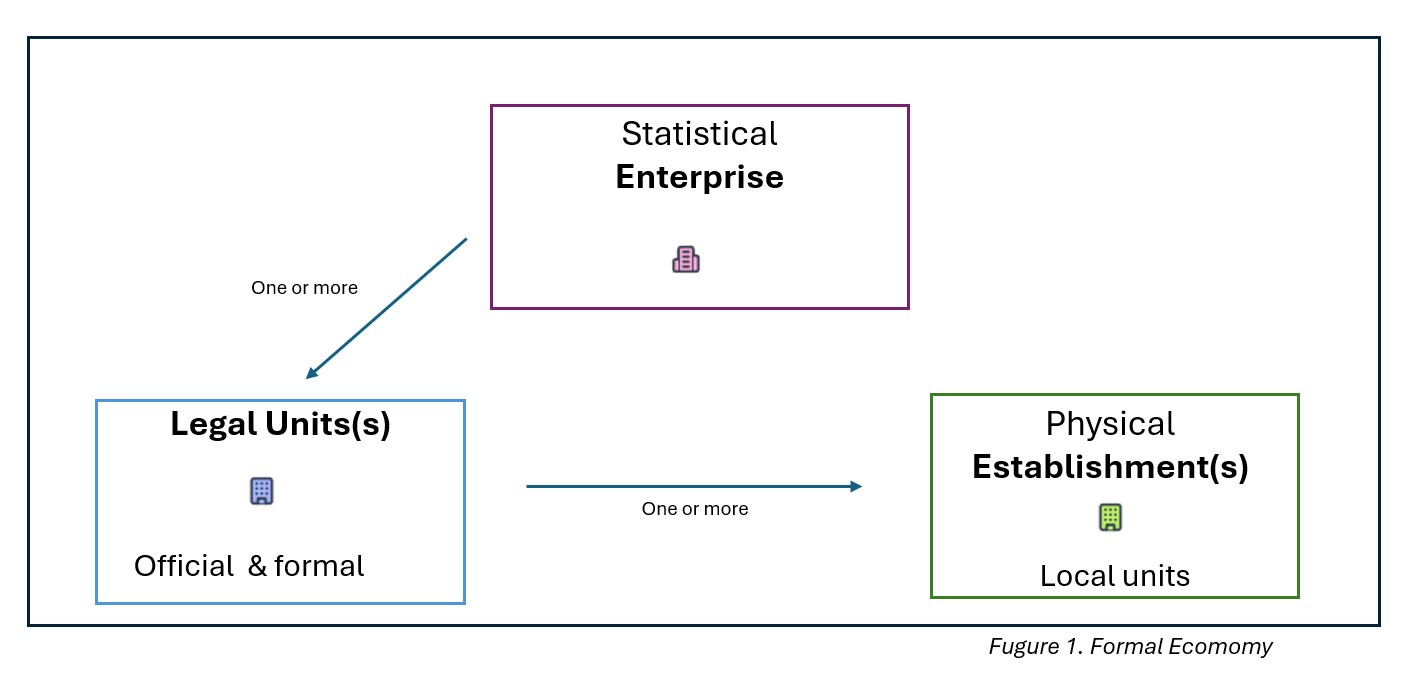
1. Formal economy.
An enterprise consists of one or more legal units (with one designated as the primary unit), and each legal unit may consist of none or more establishments. When Statbus aggregates information such as region or activity code, it uses the data from the primary legal unit.
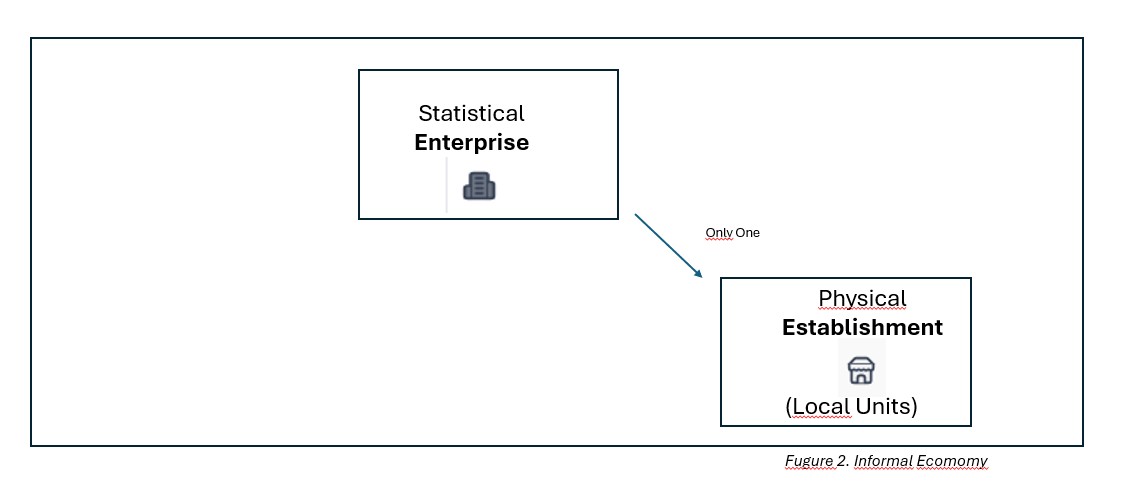
2. Informal economy.
In this case, there are no legal units involved (as in a census). The statistical enterprise is created automatically when the establishment is loaded. Each establishment will have exactly one enterprise. In Statbus, these units are shown by grey icons that indicate the absence of a legal unit. We encourage defining a data source name such as "Census2026" to make it easier to filter and find these units.
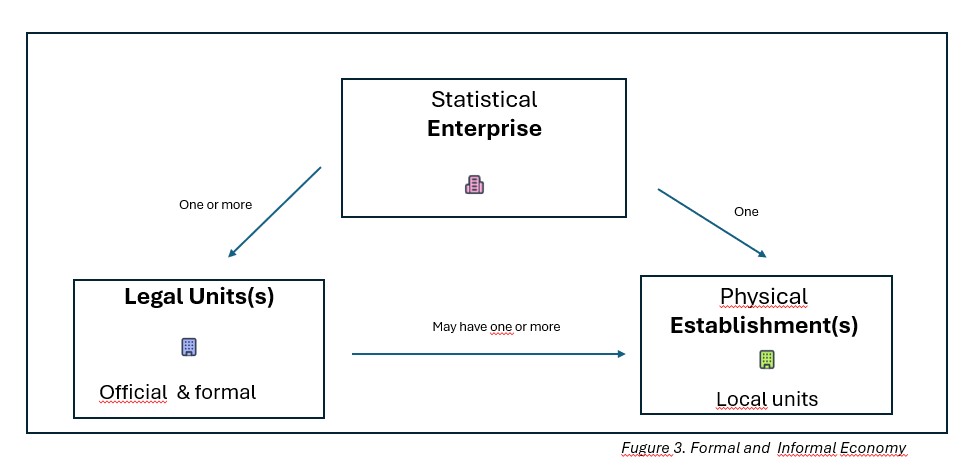
3. Combination of formal economy and informal economy.
This example illustrates a mix of 1. Formal economy and 2. Informal economy. In Statbus, the Statistical Enterprise will aggregate information from all legal units and establishments below it.
Be aware that if you have variables such as number of employees recorded at both levels, Statbus will sum them unless you separate them. To avoid unwanted aggregation, you should define level-specific variables, for example:
- legal_unit_employees
- establishment_employees
This ensures that both values are available as separate aggregates at the Statistical Enterprise level.
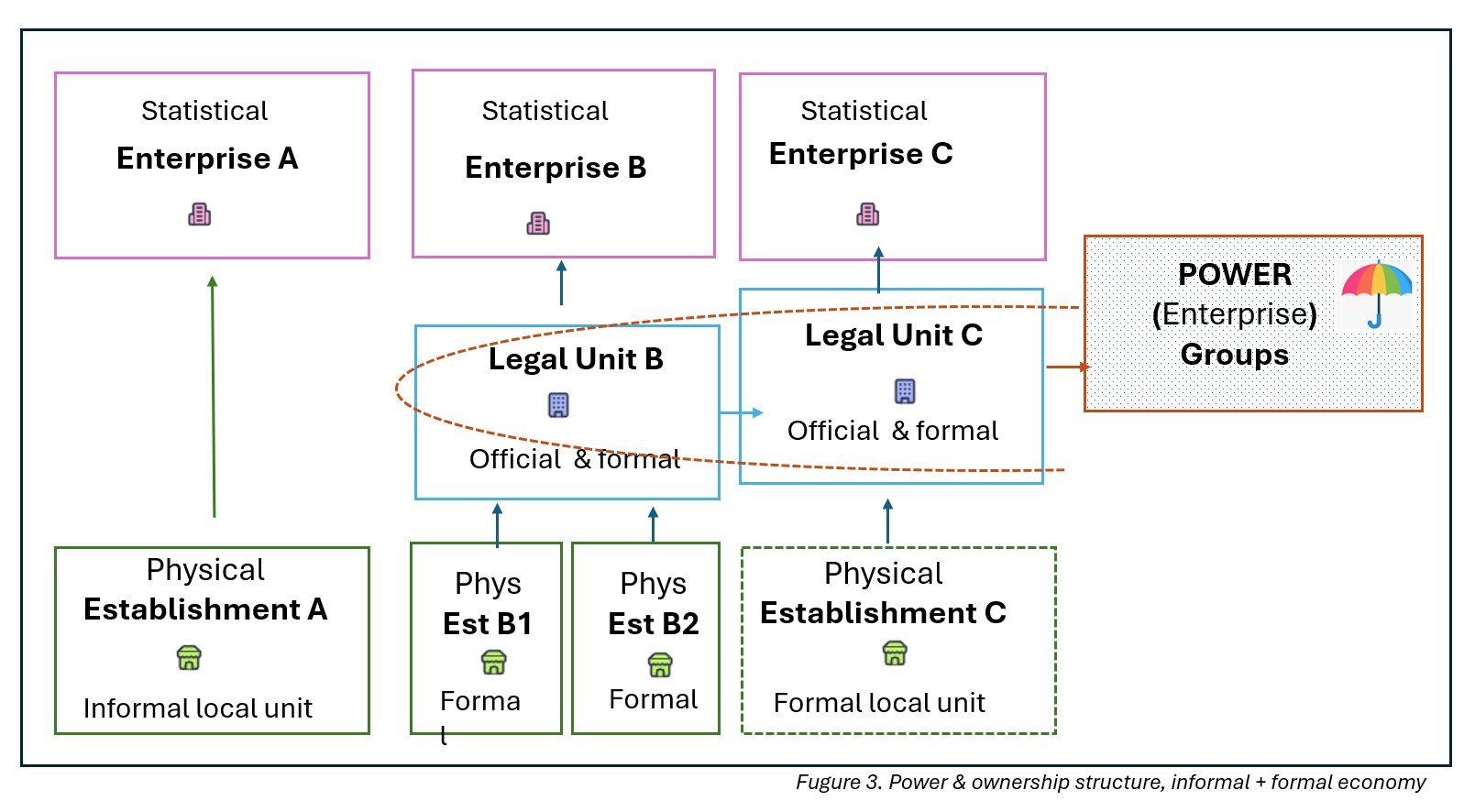
4. Below there is a complete picture with the power and ownership structure of the administrative world. Enterprise groups are not currently implemented in Statbus, but may be prioritized in future releases.
Characteristics
As the foundation for the requirement specification was the first version of these guidelines, efforts were made to include everything specified while keeping in mind that the system needs to be as simple as possible. Some characteristics were added on request from NSC and other partners (for instance whether the unit is in a (tax) free economic zone, countries of cooperation etc.).
ID elements
Ideally, each country should have a national ID number for businesses — and this ID number should be used by all relevant agencies in the public sector. Most countries do not have this, but there is often a Tax ID, a Statistics Office ID and similar which are used to help identify units across different data sources. The system has the possibility of storing up to 4 different ID numbers:
- The actual internal Statbus ID which is used by the system to identify the units.
- Tax ID: ID assigned and used by tax authorities.
- Extra IDs: Statbus can be configured to take additional IDs. The additional IDs will need to be unique or NULL / missing.
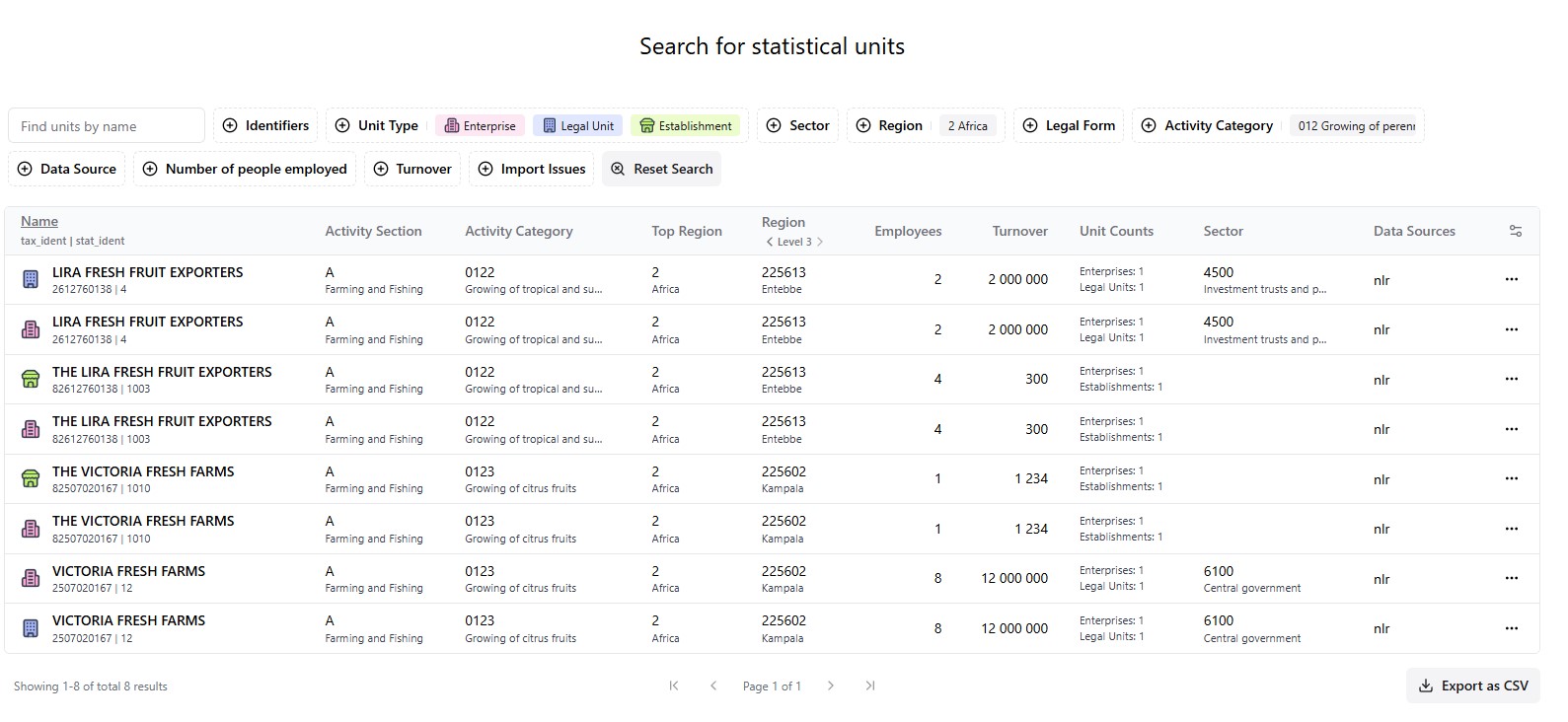
Statbus main search page for finding units based on name, IDs, regions, activity categories and more:
Functionality
The aim of the project was to have enough functionality to cover all the needs of a statistics office. In addition to viewing, searching, and editing units:
- Upload functionality from CSV/XLS files using the web application, or batch scripts.
- Reports: made by filter and search, or use the predefined standard reports.
- Create sample frames by searching for analysis and export for further processing to draw samples.
- Manage users of the system: the users (NSO employees) read / write / administrator roles.
- Knowledge of time. Statbus has the functionality to see and report the development of units over time. The system also reports number of active units and changes from month to month and from year to year.
Flexibility in the system
As this system is designed to be re-used in several countries, much weight has been given to flexibility:
- Each country can customize their Statbus with additional IDs and additional statistical variables. These fields will be searchable and available via the filters. Most countries are adding fields such as Male and Female.
- The Statbus system can also be easily customized to handle other business sized than Small, Medium and Large. Many NSO's also have the need for other statuses than Active and Passive which also can be added. The NSO decide which statuses should be counted and aggregated. The NSO's can also predefine their main datasources to get the possibility to filter on different datasources inside the application.
- Activities classification: The system comes with activity classification ISIC4 and NACE 2.1 (customizable with the possibility of an additional national level added at the most detailed level).
- Region classification: There can be up to n levels of regions specified by path. It is also possible to load regions without a hierarchy, just with names.
- Other classifications (sector codes, legal forms, roles of people related to the register, size of units etc.).
- Mandatory statistical variables: Number of Employees and Turnover.
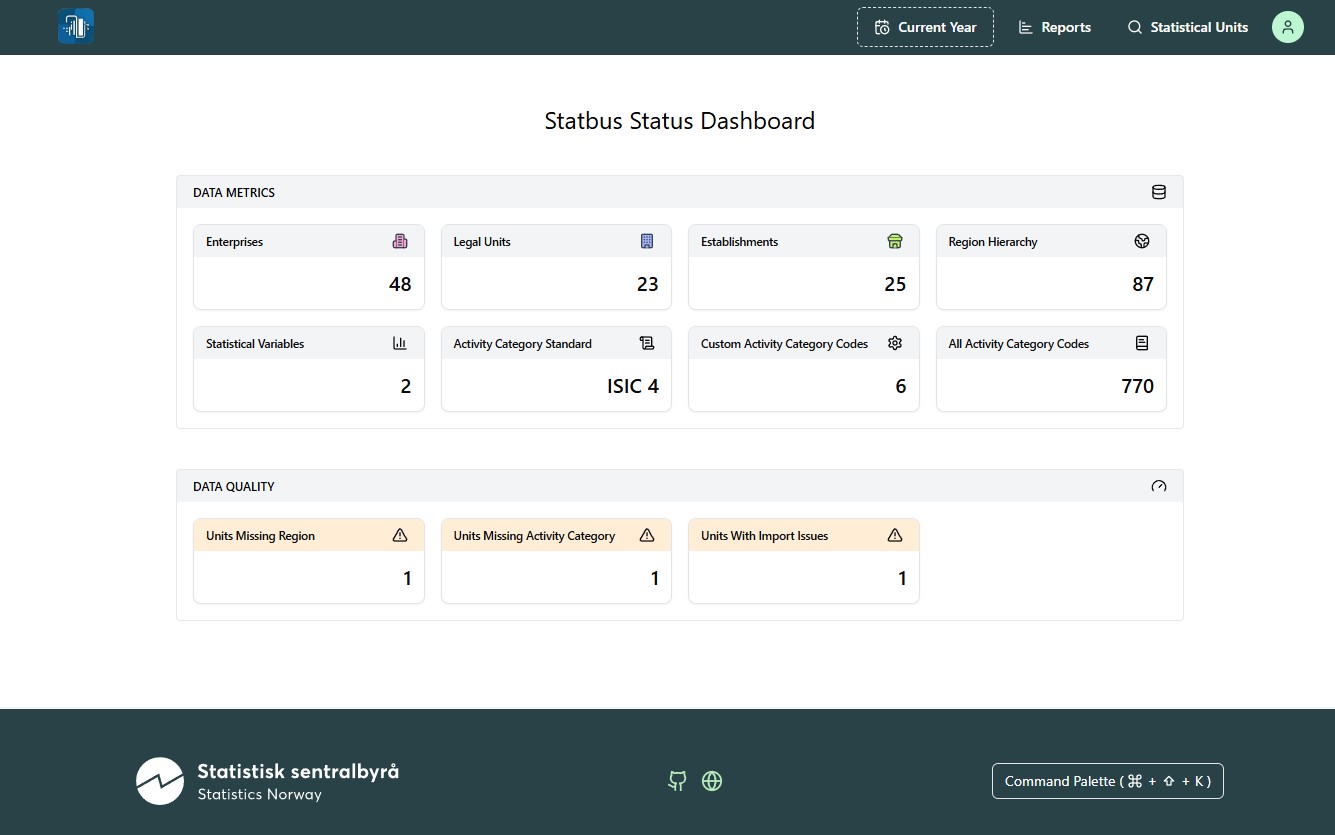
- Data quality checks: dashboard listing and guiding you to units missing activity category and regions.
- Language(s): The default language for all user interfaces is English. Additional languages will come later. Data file descriptions can however be in all languages.
Statbus Dashboard — explore and understand the data quality, and more easily get to fix issues:
Technical design
The system is designed to be simple to use, simple to understand and simply useful. The underlying database is PostgreSQL.
- See GitHub for updated information: Readme Statbus GitHub
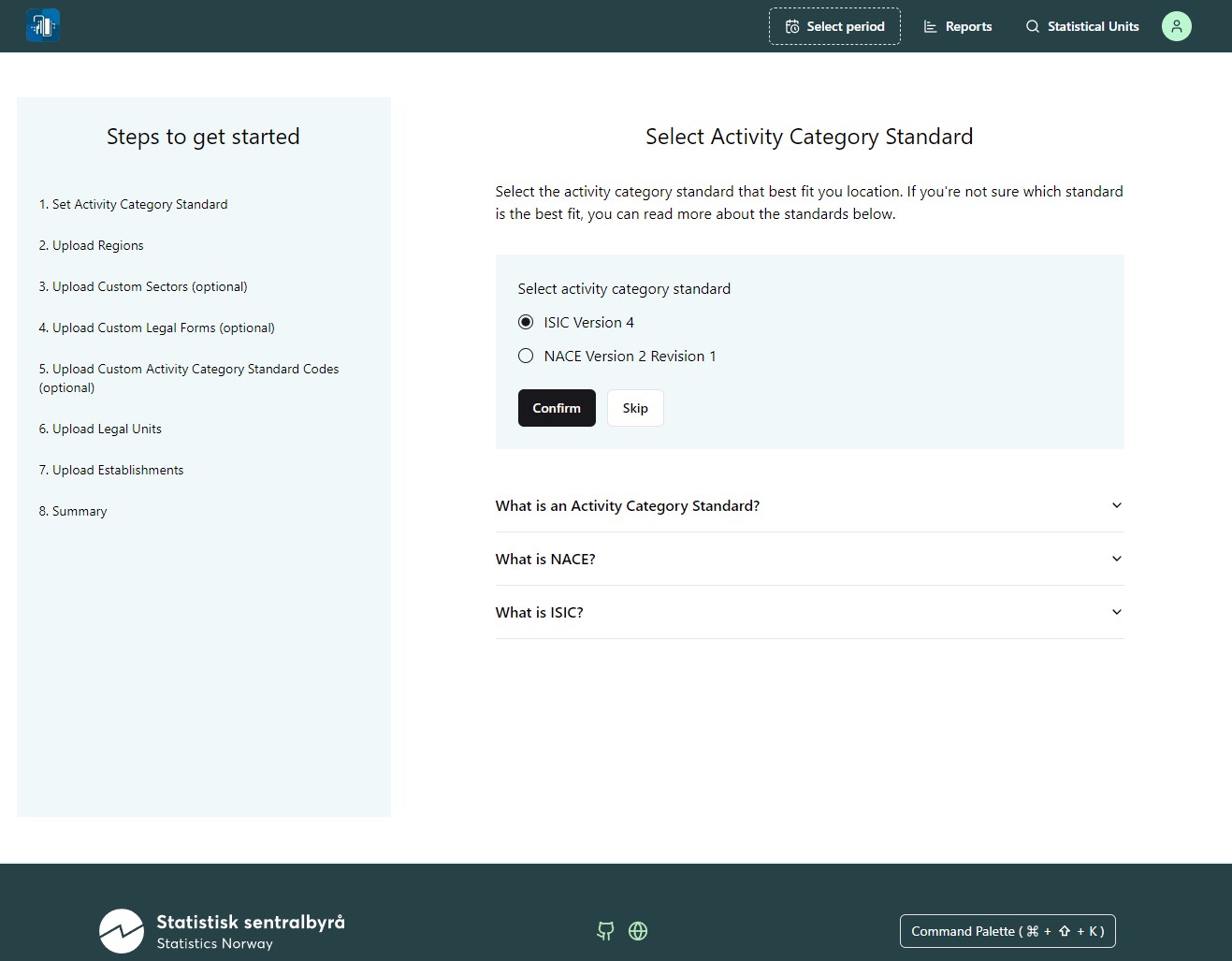
Statbus wizard for uploading data into the system:
Cloud option for testing and proof of concept
The system is currently being developed in the cloud. There are installations running that can be used for test purposes, accessible via your browser. Users will need to log in with a username and password. It is possible to have several databases / systems with test data from different countries.
Advantages of this option:
- Testing country specific data and support. Some countries have their own domain.
- No installation required (we require test files with country specific regions and some units).
- Minimal time and effort required.
- We suggest waiting with local installation of Statbus until all tests are passed and there are no significant outstanding issues.
- Improvements, fixes and new additional functionality and features will be added in the future.
- Currently we have set up Statbus domains ug, et, ma, and tcc for testing and trying with country specific classifications (regions, sectors, legal_forms, custom_activity_categories).